
Built by estate agents, for estate agents. RoomScribe – from room to report
Create professional property inventories in minutes, build shareable 360° virtual walkarounds, and keep the full condition history of every property in one place. Capture with almost any 360° camera or your phone, generate PDF and hosted online reports, compare reports over time, schedule inspection reminders, and let multiple users work from the same cloud property record — with 10GB of cloud storage per user.
RoomScribe started inside Dwelling&Manor because we needed inventories to be faster.
We built RoomScribe internally at Dwelling&Manor to solve the real on-site inventory problem: too many manual photos, too much sorting, too much admin, and too much time between walking into a room and producing a professional report.
Other agents, inventory clerks, and landlords saw the workflow and wanted to use it too. RoomScribe has now officially rolled out and is listed on The Guild of Property Professionals A-Z of suppliers.
Made from real agency work
Not a generic tech tool. Built around the pressures of appointments, keys, reports, landlords, tenants, and time on site.
Designed for speed
The whole idea is simple: reduce room capture to one 360° placement, then generate the report in just a few clicks.
Now used across the UK
Rolled out after strong reception from property professionals who wanted the same faster workflow for their own inventories.
Built by a fellow Guild Member. Now available to the wider Guild network.
RoomScribe was created from inside a working estate agency, not in isolation from the day-to-day realities of property management and lettings. It is now listed on The Guild of Property Professionals A-Z of suppliers, giving Guild Members a purpose-built inventory and property condition platform developed by one of their own.

Proudly listed on The Guild A-Z
RoomScribe is available to Guild Members looking for a faster, more connected way to create inventories, manage evidence and track property condition.
Stop walking every wall taking dozens of photos. Capture the room once.
Traditional inventories are slow because the person on site has to photograph, check, sort, organise, and build the report manually. RoomScribe cuts the slowest parts of the job.
Walk, photograph, check, sort, repeat.
The traditional process means taking lots of separate photos per room, checking angles, adding evidence manually, sorting everything afterwards, then assembling the report.
- Move around the room taking multiple separate photos.
- Risk missing corners, walls, fixtures, or wider context.
- Spend time sorting images into the right rooms and sections.
- More admin before the report is ready to send.
Drop the camera. Press once. Move on.
Place any 360° camera in the room, then let RoomScribe split the capture into clean report images and generate the inventory in a few clicks.
Bring your whole team into one RoomScribe workspace.
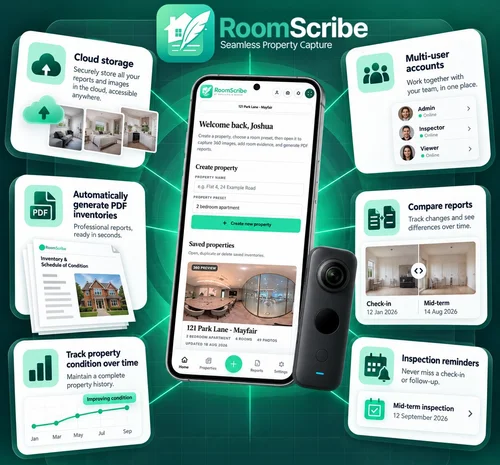
RoomScribe is not just for one person on one device. Your office can have one account and add staff, inventory clerks, property managers, maintenance people, and anyone else who needs access. Properties, photos, notes, 360° captures, reports, and inventory evidence can be saved to the cloud so your team can work together and continue jobs without passing files around. Each user receives 10GB of cloud storage.
One office account
Add your staff, clerks, property managers, and maintenance users to the same RoomScribe workspace.
10GB cloud storage per user
Store properties, photos, 360° captures, reports, and evidence securely in the cloud, with 10GB allocated to every user.
Work together
Different users can continue working on the same inventories, update property records, add evidence, and finish reports.
PDF and online reports
Generate PDF reports and interactive online reports from your cloud photos, then save, download, or share them to your device.
From one room capture to a clean PDF or online report.
Capture the room with a 360° camera or any phone-camera, store the evidence in the cloud, then let the app organise everything and generate the report.
Place the 360° camera
Drop any 360° camera into the room so the whole space is captured from one position.
Press one button
Capture the room once instead of walking around taking photo after photo.
Images split and sort
RoomScribe creates clean single images from the 360° capture and organises them into the inventory.
PDF or online report
Room notes, phone photos, 360° images, and evidence come together in a professional hosted or downloadable report.
360° speed when you want it. Traditional phone capture when you need it.
RoomScribe does not force you into one way of working. Use 360° capture to speed up the room, and use your phone camera for close-up evidence, condition notes, meters, keys, fixtures, fittings, damage, and anything else that needs detail.
Phone-camera evidence
Keep the familiar inventory workflow for the details that matter most, without switching systems.
- Close-ups for meters and internal appliances.
- Room notes and condition details kept inside the same report workflow.
- Ideal if you don’t have a 360 camera.
One-button 360° room capture
Use any 360° camera to capture the whole room quickly, then let RoomScribe turn it into clean inventory-ready images.
- No need to walk around taking dozens of separate room photos.
- Helps reduce missed angles because the whole space is captured.
- Clean single images for the report, not distorted fisheye screenshots.
- Works with any 360° camera, so there is no hardware lock-in.
No hardware lock-in. Use the 360° camera that suits your team.
RoomScribe works with almost any 360° camera, so agencies are not forced into one expensive hardware route. If you already have a camera, use it. If you need one, Dwelling&Manor has vendor routes that can help users access heavily discounted 360° cameras.
Works with almost any 360° camera
Choose the camera that fits your budget and workflow instead of being locked to a single device.
Discounted camera options
Need hardware? We can point users towards vendor options for heavily discounted 360° cameras.
Simple to roll out
Give the team one clear process: place camera, press once, add close-ups, generate report.
One RoomScribe workspace for the whole office.
Set up profiles for staff, inventory clerks, property managers, maintenance teams, and anyone else who needs access. Every user receives 10GB of cloud storage, while authorised team members can work from the same properties, reports, evidence, and condition history.
Multi-user accounts
Create staff profiles under one office account. Give your clerks, team members, and maintenance people access to the same RoomScribe workspace.
10GB cloud storage per user
Every RoomScribe user receives 10GB of cloud storage for properties, room photos, 360° files, reports, and supporting evidence.
Continue work anywhere
Because properties and photos are stored in the cloud, any authorised user can pick up the job, continue editing, add evidence, or finish the report.
Online reports
No need to rely only on PDFs. RoomScribe can host online reports directly, giving you a clean shareable report without downloading files.
PDF reports from cloud photos
Generate PDF inventory reports directly from your uploaded cloud photos, room evidence, notes, and 360° captures.
Shared property history
Keep reports together against the property so your team can see how condition changes over time instead of treating every inspection as a disconnected file.
Follow the property from report to report.
RoomScribe keeps each inspection connected to the property. Build a report history, compare two reports side by side, record comparison notes, track changes in condition over time, and set inspection reminders so important follow-ups are easier to manage.
Compare reports
Compare check-in, interim, check-out, or other reports and review what has changed between visits.
Track condition over time
Keep the property’s report history together so deterioration, improvements, and recurring issues are easier to identify.
Inspection reminders
Schedule future inspection reminders so the next property visit does not disappear into a diary or spreadsheet.
Cloud evidence
Keep the supporting photos, notes, checks, 360° captures, reports, and history attached to the same property record.
Much cheaper than the big inventory platforms. No confusing tiers.
RoomScribe is designed to be simple and affordable: one subscription tier, one monthly fee, unlimited use, and multiple users included. Standard phone photos, 360° capture, 10GB cloud storage per user, image splitting, report history, comparison tools, inspection reminders, PDF reports, hosted online reports, and 360 virtual walkarounds all sit inside the same connected RoomScribe platform.
One subscription tier
No complicated packages. The core RoomScribe workflow is included from day one.
Unlimited use
Create unlimited local inventories.
Lower monthly cost
Built to give agents, clerks, and landlords a professional inventory workflow at a much lower price point.
Multiple users included
Set up profiles for office staff, clerks, property managers, and maintenance teams under one RoomScribe account.
10GB per user included
Each user receives 10GB of cloud storage for properties, rooms, photos, 360° captures, reports, and supporting evidence.
Online reports included
Generate hosted online reports directly from RoomScribe as well as traditional PDF reports.
Capture, report, compare, remind, share.
RoomScribe now covers far more than the first inventory. It helps property teams capture evidence, generate reports, preserve history, compare condition, collaborate in the cloud, and create shareable 360° experiences.
Fast 360° room capture
Place the camera, capture the room, split the 360° image into clean report-ready views, and move on.
Phone photo evidence
Add close-ups for meters, damage, keys, appliances, fixtures, fittings, and anything that needs detail.
360 virtual walkarounds
Create interactive room-to-room virtual walkarounds with a shareable link for marketing, remote viewing, and property updates.
Professional PDF reports
Turn room notes, checks, evidence, photos, and 360° captures into polished downloadable property reports.
Hosted online reports
Publish a clean digital report directly from RoomScribe when a shareable online format is more convenient than a PDF.
Compare reports
Compare reports from different dates to help identify changes, deterioration, resolved issues, and recurring concerns.
Property condition history
Keep reports grouped against the same property and follow condition over time across check-ins, inspections, and check-outs.
Inspection reminders
Set reminders for future inspections so your team has a clearer operational follow-up process.
Multi-user accounts
Let staff, clerks, property managers, and maintenance teams work within the same RoomScribe workspace.
10GB cloud storage per user
Each user gets 10GB for property photos, 360° files, reports, and supporting evidence.
Property checks + notes
Record room condition, safety and utility checks, notes, landlord-supplied fixtures and fittings, and supporting evidence.
Guild A-Z listed
RoomScribe is listed on The Guild of Property Professionals A-Z and was developed by a fellow Guild Member estate agent.
Turn the same 360° workflow into an interactive property experience.
RoomScribe can now create immersive 360° virtual walkarounds as well as inventory reports. Build the walkaround from your phone, connect rooms into a simple journey, choose how each 360° view opens, and publish a shareable link for marketing, remote viewings, landlord updates, or property records.
It is designed to be quick enough for everyday agency use — not a separate specialist production process.
Interactive viewing, without the complicated setup.
Create a connected 360° journey through the property and share it straight from RoomScribe.
- Interactive room-to-room 360° virtual walkarounds.
- Create the walkaround directly from your phone or tablet.
- Set room starting views and zoom for a cleaner viewing experience.
- Use hotspots and a floorplan-style journey between spaces.
- Publish a shareable link for property marketing and remote viewing.
Simple answers for agents, inventory clerks, landlords, and property managers.
Clear answers on 360° capture, virtual walkarounds, multi-user accounts, 10GB cloud storage per user, report comparisons, condition history, reminders, online reports, and pricing.
What makes RoomScribe different?
RoomScribe was built by estate agents for estate agents. Its biggest USP is speed: place any 360° camera in the room, press one button, and generate the report in just a few clicks while still being able to add traditional phone-camera evidence.
Why does 360° capture make inventories faster?
The whole room can be captured from one camera placement, which means fewer manual room photos, less time walking around the space, less sorting afterwards, and less risk of missing an important angle.
Can I still use normal phone photos?
Yes. RoomScribe supports traditional inventory capture through the phone camera for close-ups, meters, keys, damage, fixtures, fittings, notes, and any extra evidence you want in the report.
Does it work with any 360° camera?
RoomScribe is designed to work with almost any 360° camera, so teams can use hardware they already own or choose the camera that suits their workflow and budget.
Can you help us buy 360° cameras?
Yes. Dwelling&Manor has vendor routes that can help users access heavily discounted 360° cameras, making it easier and cheaper to get started.
Can we have multiple users on one account?
Yes. RoomScribe supports multi-user accounts, so an office can create profiles for staff, inventory clerks, property managers, maintenance people, and other team members. Multiple users are included in the same monthly price.
Does RoomScribe include cloud storage?
Yes. Every user receives 10GB of cloud storage for properties, photos, room evidence, 360° captures, reports, and supporting files. Authorised users can continue working from the same cloud property records without manually passing files around.
Can another team member continue a report?
Yes. Because property photos and evidence can be stored in the cloud, authorised users on the account can continue working on the same property, add more evidence, edit details, or generate the final report.
Do I have to generate a PDF?
No. RoomScribe can generate PDF reports and hosted online reports. Online reports are hosted straight from RoomScribe, so you can share a clean digital report without needing to download a PDF first.
Can RoomScribe create 360° virtual walkarounds?
Yes. 360 virtual walkarounds are now a live RoomScribe feature. You can connect rooms into an interactive journey, set how each view opens, and publish a shareable link for marketing, remote viewings, landlord updates, or property records.
Can I compare one report with another?
Yes. RoomScribe keeps reports linked to the property and lets you compare reports from different dates, helping you review changes in condition and keep comparison notes against the property history.
Can RoomScribe remind us when an inspection is due?
Yes. Inspection reminders can be scheduled so future visits and follow-ups are easier for the team to keep track of.
Is RoomScribe on The Guild A-Z?
Yes. RoomScribe is listed on The Guild of Property Professionals A-Z of suppliers and was built by a fellow Guild Member estate agent.
How does RoomScribe pricing work?
RoomScribe keeps pricing simple: one subscription tier, one monthly fee, unlimited use, and multiple users included. It is built to be much cheaper than competing inventory platforms without locking core features behind higher-priced plans.
Who is RoomScribe for?
RoomScribe is for estate agents, inventory clerks, landlords, and property managers who want faster inventories, professional reports, 360 virtual walkarounds, shared cloud working, property history, report comparisons, inspection reminders, and a simple workflow their team can actually use.
Ready to turn room capture into a few clicks?
Book a RoomScribe demo to see the full platform: fast 360° room capture, phone evidence, professional PDF and online reports, 360 virtual walkarounds, multi-user cloud working, 10GB storage per user, property history, report comparisons, and inspection reminders.